Discover Unique Minecraft Seed Finders to Find Awesome Worlds
Discover Unique Minecraft Seed Finders to Find Awesome Worlds
A Minecraft Seed Finder is a tool that allows a player to view specific worlds before creating a new one. The tools assist a player in entering specific details, such as structures, biomes, and villages, in order to create a suitable seed for his/her adventure.
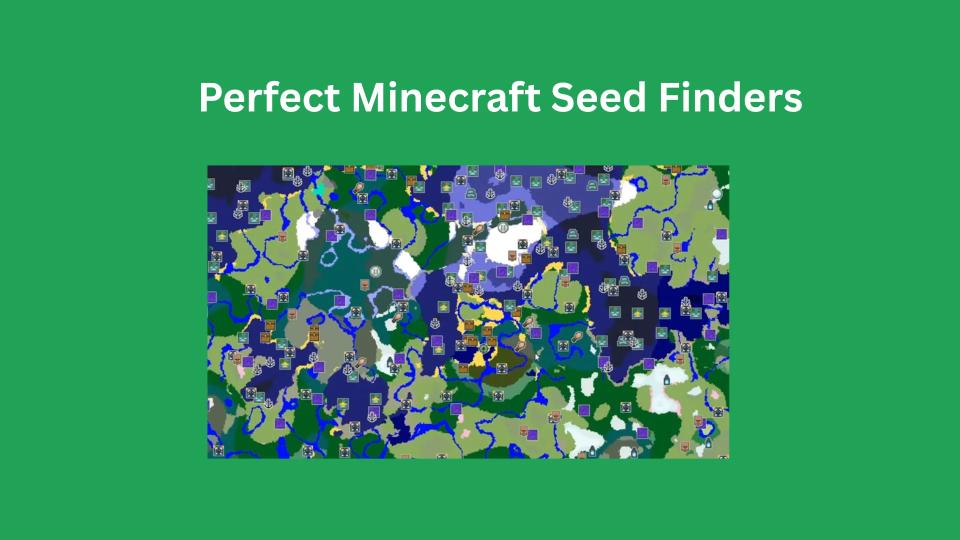
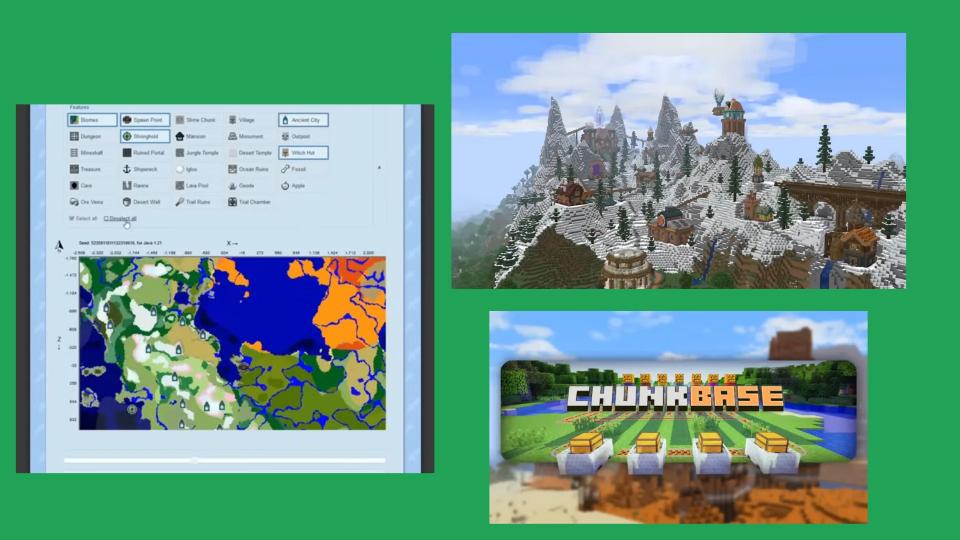
Also, in this category, some of the most used seed finder software like ChunkBase provides the interactive maps to see the world layout before actually playing games like Minecraft APK and Minecraft Java Edition.
Are you looking for trusted resources such as Minecraft Seed Finders, Biome Finders, or Diamond Finders, applicable to both Java and Bedrock versions? Well, you are at the right destination, as this article will present to you an in-depth review of how such resources can help you take your Minecraft experience to the next level.
Populer Seed Finder Tools
Minecraft Seed Finder: It helps to locate various terrains and structures.
Minecraft Seed Finder Bedrock :Specially designed for the Bedrock Edition.
Biome Finder Minecraft : Detects biome locations within a specified seed.
Diamond Finder: Locates diamonds in the current world.
Minecraft Seed Map Viewer : It allows users to display their generated map in detail.
Best Minecraft Seed Finders
If you are looking for the perfect seed finder tool can help you discover amazing landscapes, biomes, and structures without wasting time exploring random worlds. Here are some of the best Minecraft seed finders available:
ChunkBase
- Best for: Specific biomes, structures & ores find karna
- Supports: Java & Bedrock
- Features: Stronghold, village, dungeon & biome finders
- Link: Visit ChunkBase
Minecraft Seed HQ
- Best for: Pre-tested & community-recommended seeds
- Supports: Java & Bedrock
- Features: Handpicked survival, creative & speedrun seeds
- Link: Visit Minecraft Seed HQ
SeedMap.net
- Best for: Filters ke sath seeds search karna
- Supports: Java & Bedrock
- Features: World traits ke sath seeds generate & browse karna
- Link: Visit SeedMap.net
MCSeeder
- Best for: Random seeds generate karna with filters
- Supports: Java & Bedrock
- Features: Custom filters for biomes, terrain & structures
- Link: Visit MCSeeder
Reddit & Minecraft Forums
- Best for: Real players ke tested seeds
- Supports: Java & Bedrock
- Features: Community-discovered unique seeds with descriptions
- Link: r/minecraftseeds

How to Use a Minecraft Seed Finder?
Choose a Seed Finder Tool
Pick a tool like:
- ChunkBase – Find biomes, villages, strongholds.
- MCSeeder – Generate random seeds.
Set Your Preferences
Most seed finders allow you to filter and search for specific world features:
- Biomes: Jungle, Desert, Taiga, Mushroom Island, etc.
- Structures: Villages, Strongholds, Ancient Cities, Mansions.
- Resources: Ores, Diamonds, Spawners, Nether Fortresses.
If you want a seed with a Jungle Temple and a Village nearby, you can filter for these options.
Generate & Copy the Seed
- Entered your preferences:
- Click on “Find Seed” or “Generate Seed”.
- The tool will display a list of matching seeds along with coordinates for important locations.
- Some tools like ChunkBase also provide a visual map of the world.
If you don’t find a perfect seed, adjust your filters and try again.
Use the Seed in Minecraft
Copy the Seed Number provided by the tool.
Open Minecraft → Create New World
Paste the Seed Number in the “Seed for World Generation” box.
Click Create World and start playing in your custom-generated seed.
Save & Share
Save the seed number: if you want to reuse the world later. Share it with friends: if they want to play in the same world. Using a seed finder helps you start in the perfect Minecraft world instantly.

Minecraft Biome Finder
Minecraft Biome Finder is a utility designed to aid players in finding specific biomes with a given seed number. The Minecraft Biome finder is important in finding certain biomes like Mushroom Islands, Badlands, Ice Spikes, or Jungles without going through them physically.
Best Biome Finders
ChunkBase Biome Finder
- Best for: Kisi bhi biome ko seed ke through find karna
- Supports: Java & Bedrock
MineAtlas
- Best for: Simple biome preview with terrain details
- Supports: Java Edition
Amidst
- Best for: Detailed biome & structure maps
- Supports: Java Edition
How to use a Biome Finder?
1)Please enter the world seed in the tool.
2)Enter the type of biome you want to locate.
3)It will also generate coordinates for the same biome.
4)Visit the location in-game to explore it.
Minecraft Diamond Finder
A diamond finder can assist players in finding the diamond ore effectively. It is a mining tool that can scan the chunk coordinates to determine the optimal place to mine diamonds.
How to use a Diamond Finder?
1:Enter the word seed in the given tool.
2:The tool will mark the areas that are rich in diamonds in your seed.
3:Mine Y-Level -58 to -64 for the best chances to find diamonds.
Minecraft seed finder bedrock
A Minecraft Seed Finder for Bedrock can be best explained as an instrument used by players in the game to help find their preferred seeds for the game. These applications enable players to find their preferred biomes, villages, strongholds, and more without having to traverse different worlds in the game repeatedly. Seed finders like ChunkBase include an interactive map that helps you find the best seed for your game in Minecraft Bedrock Edition.
FAQs-Frequently Ask Question
Are Minecraft seed finders free?
Yes! Most are completely free to use online. No download needed. Just open the site and start exploring.
Will the seed look the same in every version?
Not always. Seeds can look differnt. Make sure you’re picking the right version on the site to get the best match.
Can I create my own seed?
Yes! You can type in any word or number to create a custom seed. Like “DINOSAUR123” or “supervillage.” The game turns that into a unique world.
Is it cheating to use a seed finder?
Not at all! It’s just a fun way to plan your adventure. You’re still doing all the mining, building, and surviving yourself. Seed finders just help you find a world you like.